
Motorola Big-Endian (@0 Sawtooth) vs. Intel Little-Endian (@1) CAN Bit Numbering
The #1 cause of silent automotive ECU signal corruption is mixing Intel Little-Endian (@1) LSB start bits with Motorola Big-Endian (@0) MSB sawtooth bit numbering inside the same 64-bit or 512-bit CAN FD payload.
1. Standard CAN Byte & Bit Grid Indexing (0..63)
Within every CAN payload byte B (0..7 for Classic CAN, 0..63 for CAN FD), bits are numbered 0..7 from LSB (right) to MSB (left): flatBit = B * 8 + bitInByte.
| Byte | b7 (MSB) | b6 | b5 | b4 | b3 | b2 | b1 | b0 (LSB) |
|---|---|---|---|---|---|---|---|---|
| Byte 0 | 7 | 6 | 5 | 4 | 3 | 2 | 1 | 0 |
| Byte 1 | 15 | 14 | 13 | 12 | 11 | 10 | 9 | 8 |
| Byte 2 | 23 | 22 | 21 | 20 | 19 | 18 | 17 | 16 |
2. Intel (@1) Contiguous Upward vs. Motorola (@0) Sawtooth Step
- Intel Little-Endian (
start|len@1+):startis the LSB; bits advance monotonically upwardstart .. start + len - 1. Example:24|16@1+occupies bits24..39(Byte 3LSB →Byte 4MSB). - Motorola Big-Endian (
start|len@0-):startis the MSB; each step moves toward bit.0of the current byte, then jumps+15to bit.7(MSB) of the next byte:
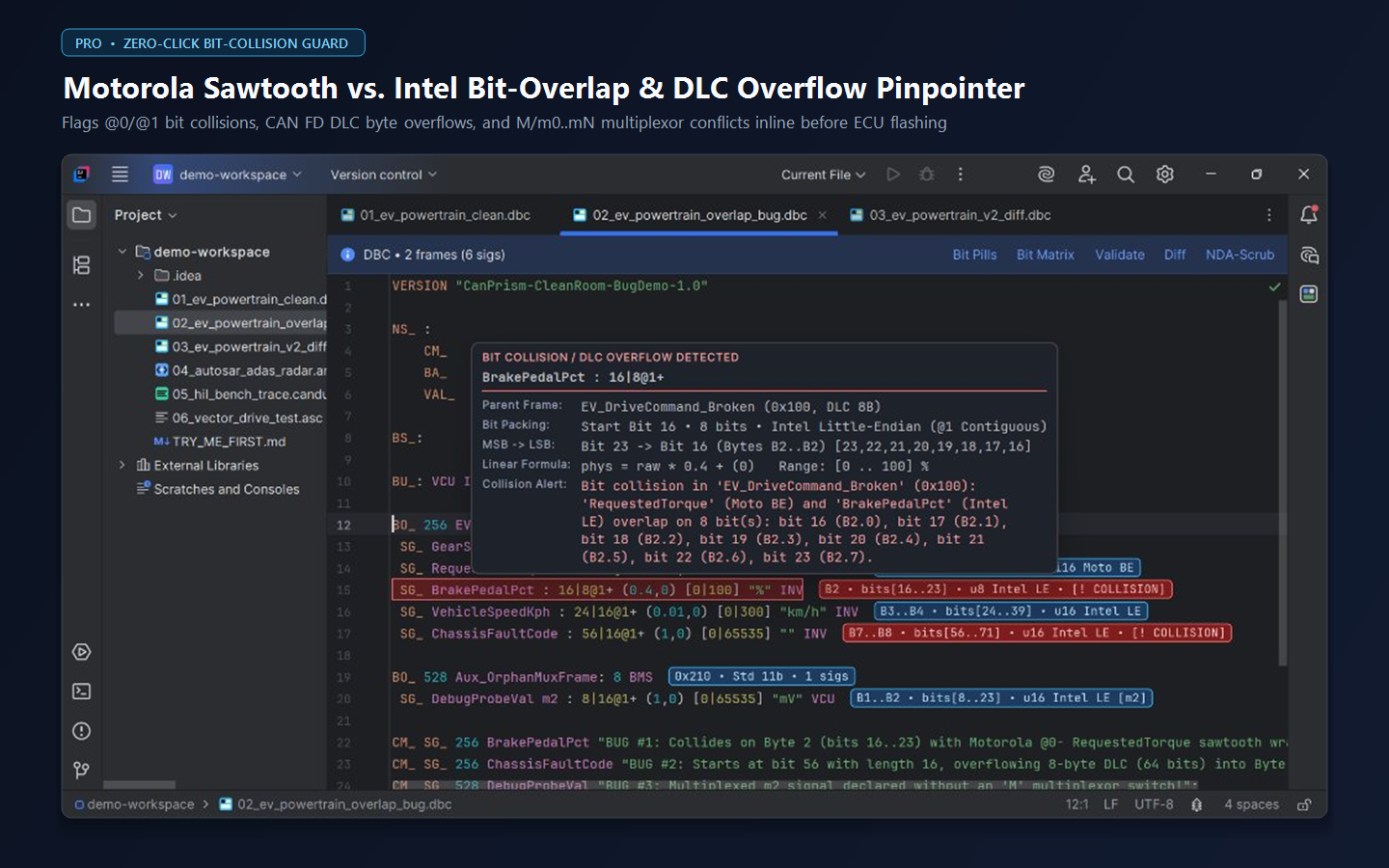
nextMotorolaBit(b) = (b % 8 == 0) ? (b + 15) : (b - 1)15|16@0- Colliding with 16|8@1+!
A developer sees SG_ RequestedTorque : 15|16@0- and assumes it occupies bits 0..15 (Bytes 0..1). In reality, starting at bit 15 (Byte 1, b7) steps down 15..8 (Byte 1), then jumps +15 to bit 23..16 (Byte 2) — colliding head-on with SG_ BrakePedalPct : 16|8@1+ on all 8 bits of Byte 2!
Frequently Asked Engineering Questions
How does AUTOSAR ARXML PACKING-BYTE-ORDER map to DBC @0 and @1?
AUTOSAR MOST-SIGNIFICANT-BYTE-FIRST maps to Motorola Big-Endian (@0) where START-POSITION specifies the MSB, whereas MOST-SIGNIFICANT-BYTE-LAST maps to Intel Little-Endian (@1) where START-POSITION specifies the LSB.
Inspect, Validate, Diff, Decode & Scrub CAN / AUTOSAR Offline in Your JetBrains IDE
Never paste OEM NDA .dbc or AUTOSAR .arxml signal matrices into browser viewers. CanPrism DBC ARXML Viewer runs 100% air-gapped inside CLion, PyCharm, RustRover, IntelliJ IDEA, Rider, DataGrip, GoLand, and WebStorm with a forever-free core tier and a 14-day [Pro] trial.